Click here for the Japanese version.
2008.8.6 World CALL Poster Session Handout / Poster / Sample passage (PDF Download)
Cloze Generator
Last updated on Aug. 2, 2017
Kenji Kitao
(Doshisha University)
kkitao [at] mail.doshisha.ac.jp
Kenichi Kamiya
(Osaka Institute of Technology)
kamiya [at] ip.oit.ac.jp
Overview
|
Cloze Generator (CG) makes cloze exercises (i.e., insert blanks in) from English passages you provide, which can then be used for a test or an exercise. And remember, it’s FREE! You can make blanks for every n-th word automatically. CG makes blanks in the passage, provide alternative answers in random order following the text using the words deleted from the text, and provide the correct answers on the bottom of the page in the order of the blanks. You can also export an html file compatible with anaume.js, a web-based e-learning exercises program script provided by the presenters. We are so afraid that the two function, Cloze Vocaburary Level and Cloze Part of Speech, are not available anymore, due to shutdown of the website which this software accesses to. |
|
Download Software
|
Cloze Generator for Windows XP/Vista |
|
|
Cloze Generator for Mac OS X |
|
|
Script and Style sheet for E-learning * |
|
* These two files are needed to be uploaded or saved on the same directory together with an exported html file you made.
How to Use Cloze Generator
This software is largely self-explanatory. Cloze Generator for Windows XP/Vista is provided by an installer application. When you are done with installation, start the program by opening the shortcut Cloze Generator on your desktop.
(If you cannot use the installer application for security reasons, please use the zipped file. Extract the file and you will find mwb_tool.exe in the folder.)
Cloze Generator for Mac OS X is provided by a zip file. Extract and open the file. To start the program, open Cloze Generator.app.
Ordinary procedures to make blanks
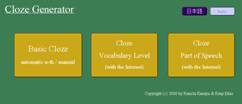
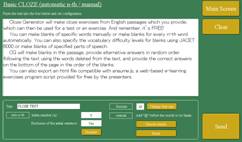
On the main screen, click "Basic Close automatic n-th / manual." Then, copy and paste your passage into the box.
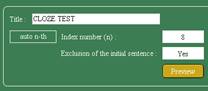
- For making each n-th word blank automatically, set configuration in the auto n-th section. (lower left)
|
|
a. Specify Index number (n), for example, 6 or 7. The default is 8. |
|
b. You can choose whether you make blanks in the first sentence or not. |
|
|
c. Click “Preview” to see what the cloze looks like. Words deleted-to-be are shown with @. |
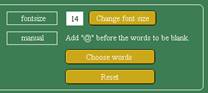
- For making blanks with the specific words you want manually, set configuration in the manual section. (lower right)
|
|
a. To enlarge the font size, in order to work adding @ smoothly, select the size and click the next “Change font size” button. |
|
b. Add @ without any space in front of the words you want to make blanks.* |
|
|
c. You can specify a certain word, which will be replaced by blanks throughout the passage. Click “Choose words.” |
|
|
d. To erase all the @ from the passage, click “Reset.” |
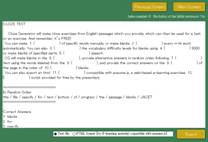
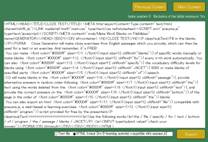
- Click “Send.” The result is shown on another window shortly.
- Choose “Text file” or “HTML
format.” To get the file, click “Export” and save it with the extension
of “.txt” or “.html”
* In languages which do not have spaces between words, such as Japanese, you need to put a space before @ in front of the parts you want to make a blank, and a space right after the parts.